A calm, realistic day
An ADHD planner app that forgives a bad day
Open Sunsama is an ADHD-friendly daily planner for a calm, realistic day. You pick a few tasks, see how long they take, and work on one at a time. Anything you don't finish rolls to tomorrow.
Get started · Download for desktop
The short answer
Open Sunsama is an ADHD planner app built around the day going wrong
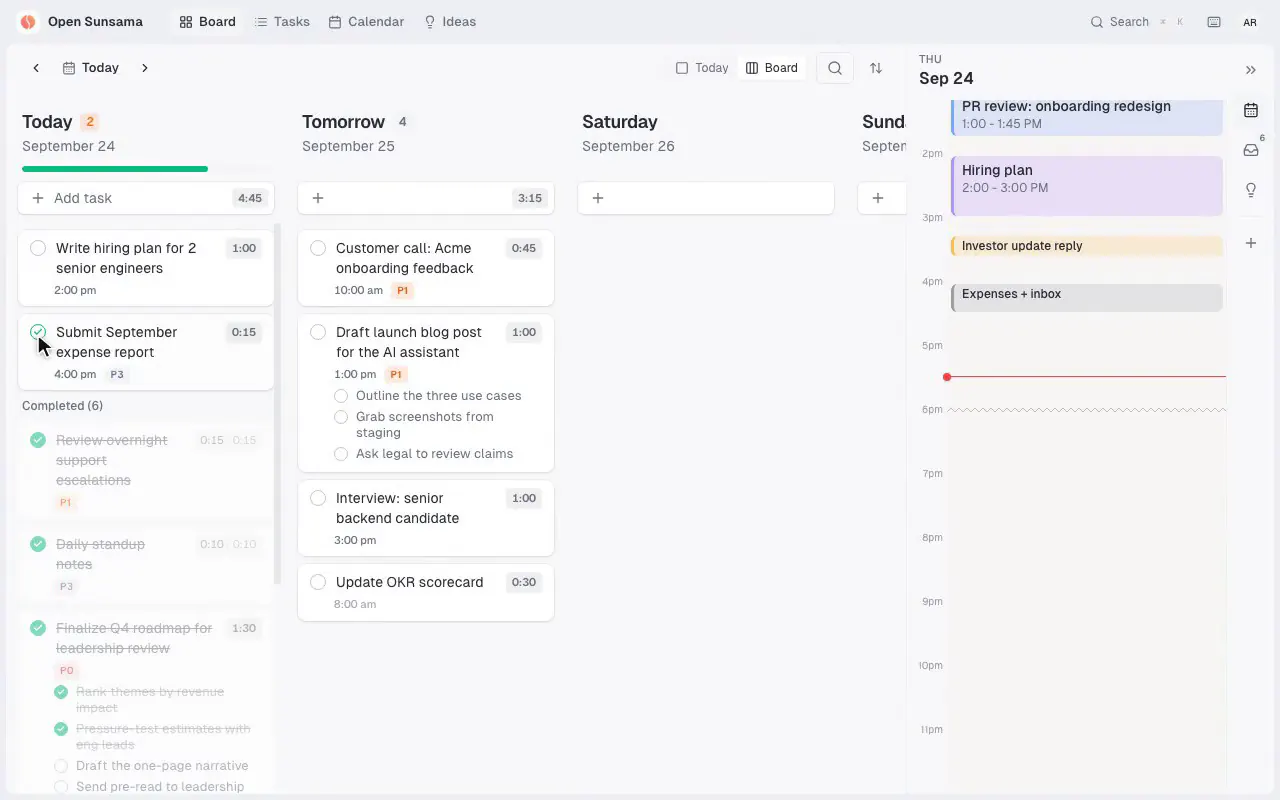
Open Sunsama is a daily planner that works as an ADHD planner app. It shows your tasks on a board of days and your time on a calendar, side by side.
It helps with three things people with ADHD often name: planning too much, losing track of time, and falling behind. You see the hours before you commit. A timer keeps count. And unfinished tasks move to tomorrow without a fuss.
It is a planner, not a treatment. If a plan falls apart, the app doesn't punish you. You just start again.
What helps
- Each day shows the total time you planned, so you stop at a realistic day.
- Time blocks give each task a start and an end on your calendar.
- Focus mode shows one task and a timer, not your whole list.
- Unfinished tasks roll over to tomorrow on their own.
- Any AI agent can turn a brain dump into tasks, or help you get back on track.
What gets in the way
Each part of Open Sunsama answers something that makes planning hard
People with ADHD describe the same problems again and again: a wall of stuff, time that slips away, and systems that need babysitting. Here is what Open Sunsama does about each one.
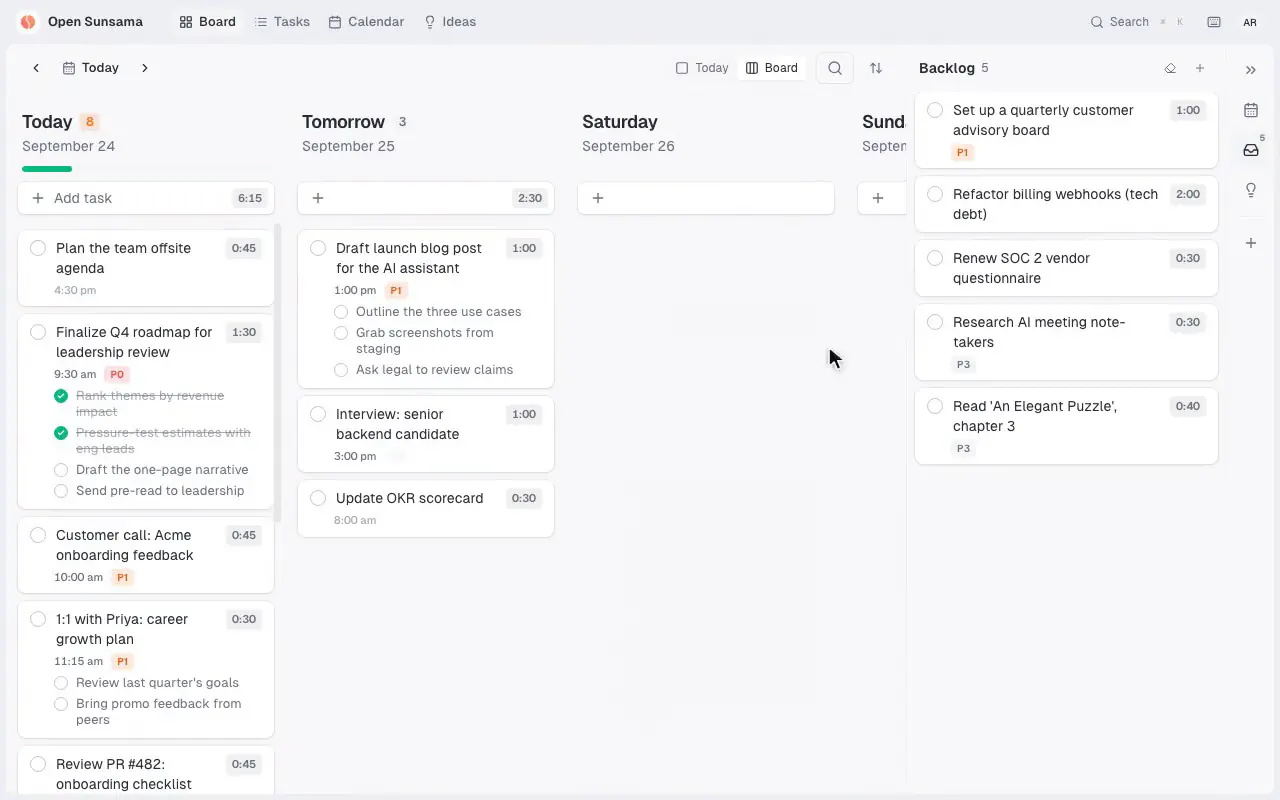
You see a realistic day before you start it
It's easy to put 12 tasks on a day that has room for 4. Then the day feels like a failure by lunch.
Give each task a guess in minutes. Each day adds them up and shows the total at the top. When the number looks too big, move a task to tomorrow.
- Drag tasks between days, or press D to push one to tomorrow
- Press Z to send a task to the backlog, out of sight but not lost
- Mark what matters most with P0 to P3
Time blocks make time something you can see
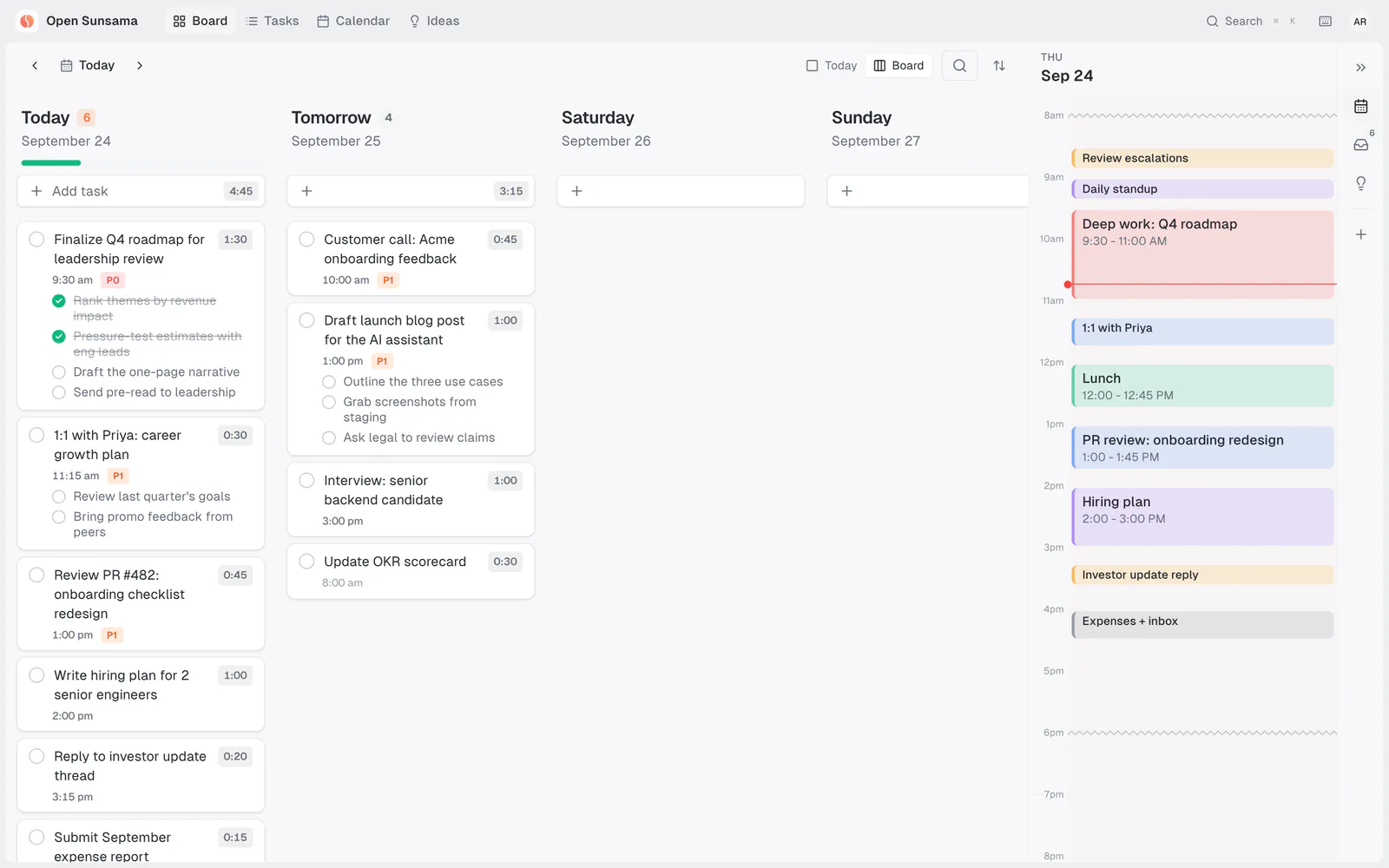
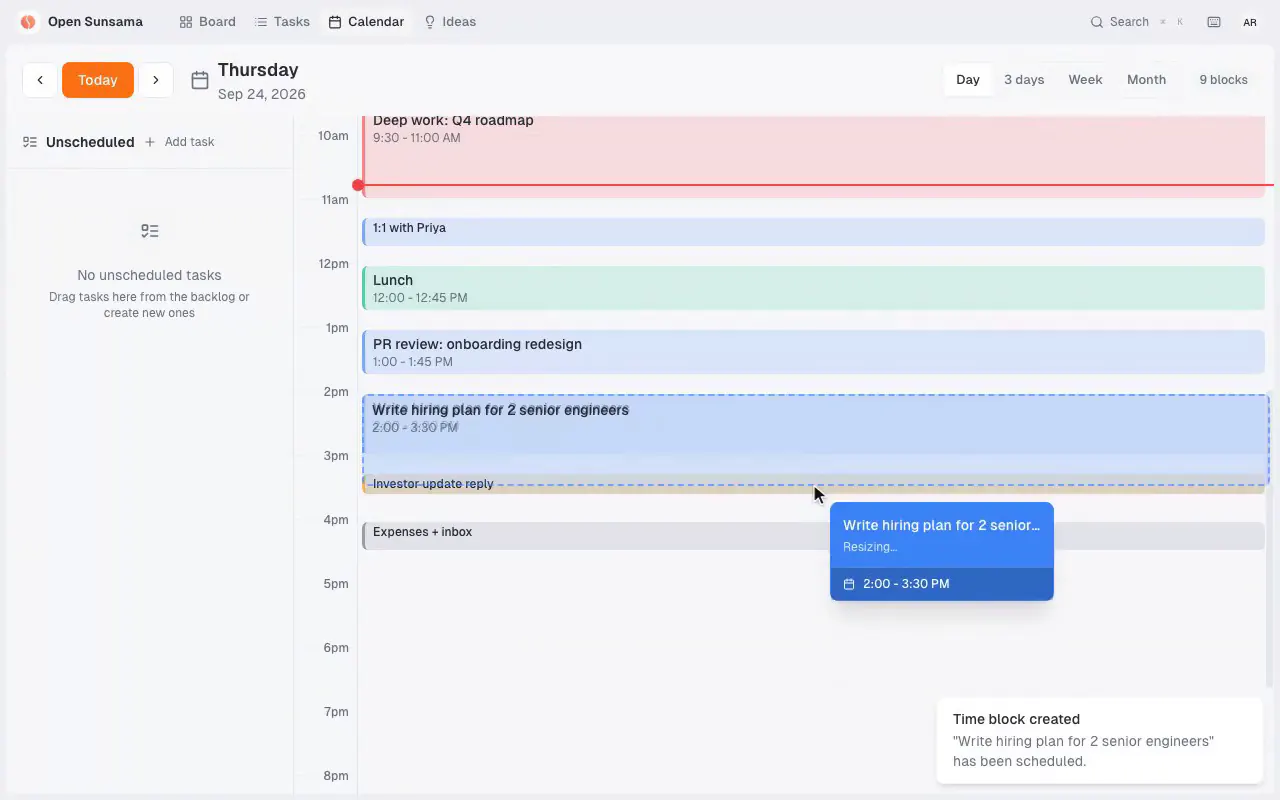
Time blindness makes "later" feel like forever. A block on the calendar turns a task into a real stretch of time, with an end.
Drag a task onto the day view and stretch it to fit. Your meetings from Google Calendar, Outlook and iCloud sit right beside it.
Turn on email reminders, and Open Sunsama writes to you before a block starts.
Focus mode puts one task on the screen
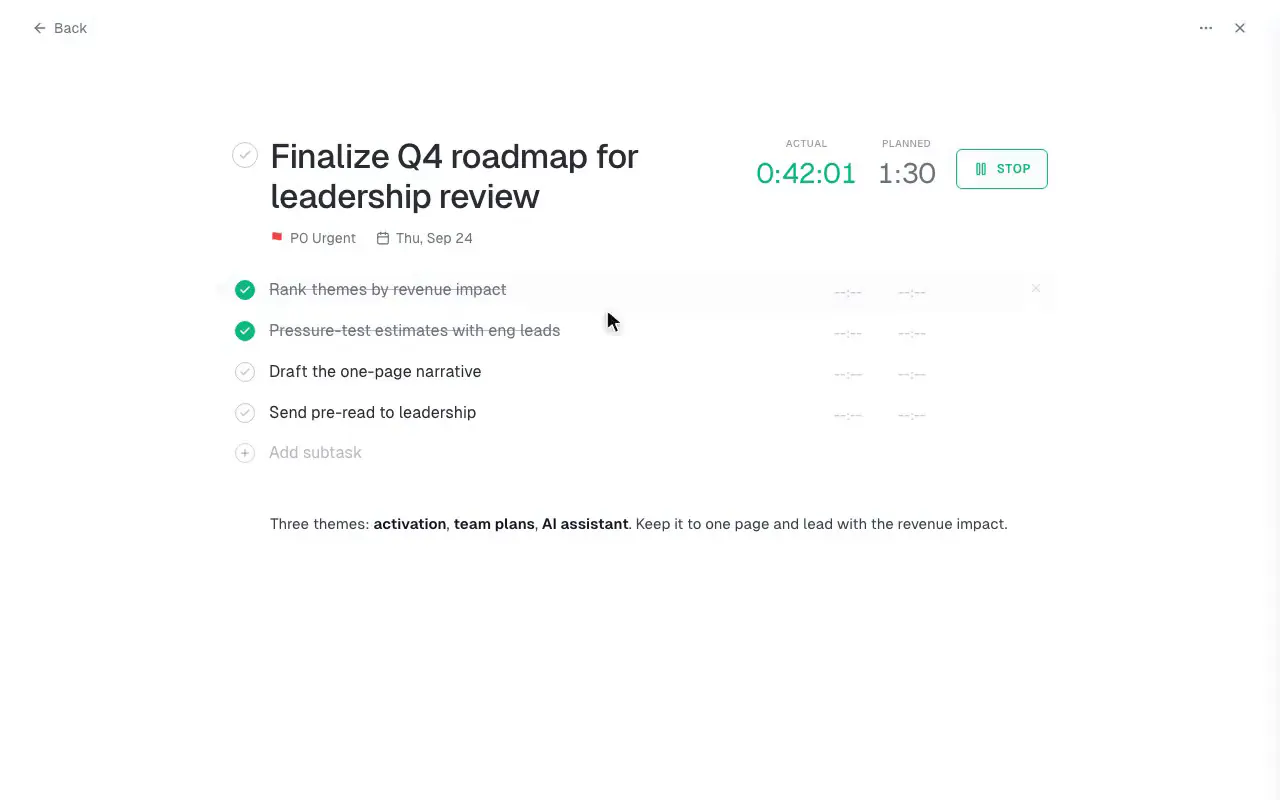
Start focus on a task, and the rest of your list goes away. You see the task, its subtasks and a timer.
The timer logs real time next to your guess. Over a few weeks, you learn how long things really take. That is planned vs actual.
A bad day doesn't turn into a wall of overdue tasks
Some apps greet you with a red list of everything you missed. Open Sunsama moves unfinished tasks to the next day on its own, so tomorrow starts clean.
At the end of the day, check off what you did. That's it. No streaks to break and no score to keep up.
AI native
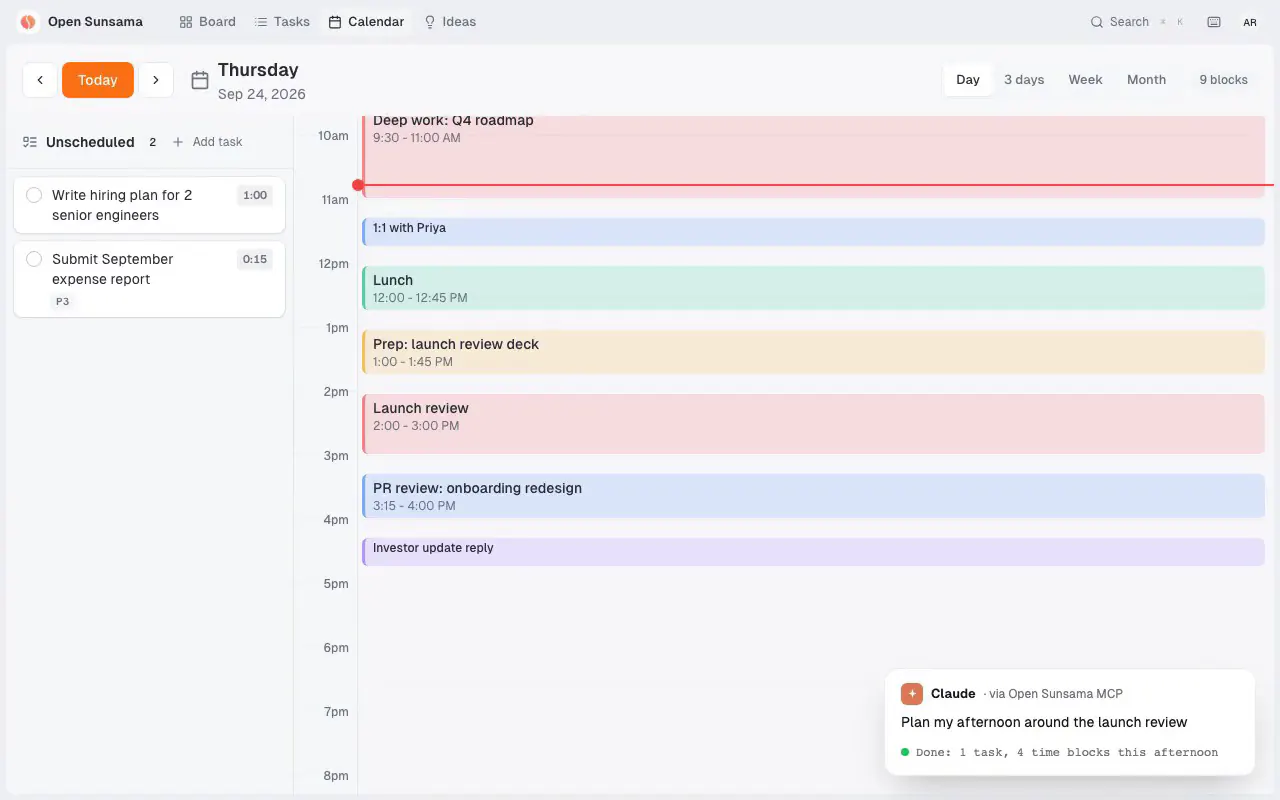
Claude, ChatGPT or any AI agent can help you get back on track
Connect your AI app with one URL. Then ask for help in plain words, the way you'd ask a friend.
Your agent reads your tasks and your calendar. It can turn a messy brain dump into tasks, split a big task into small steps, or move what's left into the free time you really have.
You stay in charge. Nothing is hidden: every change shows up on your board right away, and you can drag it back.
MCP server URL: https://api.opensunsama.com/mcp
Prompts to try
- Here's my brain dump. Turn it into tasks for this week.
- Yesterday went off track. Help me get back on track.
- I only have 3 hours today. What should I drop?
- Break "do my taxes" into small steps.
Tools it calls: list_tasks, create_task, create_subtask, schedule_task, get_schedule_for_day
A typical day
Here is what a day with ADHD can look like in Open Sunsama
An example day, with a slip in the middle. That's on purpose: the plan is built to bend.
9:00 AM: Pick three tasks, not twelve. Drag three tasks from the backlog into Today and give each one a guess in minutes. The day's total shows at the top, so you see 7 hours of work before you commit to it.
9:10 AM: Give the first task a real slot. Drop "Reply to the landlord" onto the calendar at 9:30. Now it has a start and an end, not just a spot on a list.
9:30 AM - 10:15 AM: One thing on the screen. Start focus mode. Your list goes away, and you see one task and a timer. The timer keeps count, so you don't have to.
10:15 AM: An hour disappears. A rabbit hole, a phone call, a nap. Nothing breaks. Your tasks are still where you left them.
11:30 AM: "Help me get back on track". Ask your AI agent to look at what's left and the free time around your meetings. It suggests a smaller plan, and you say yes or change it.
2:00 PM: Doctor's appointment. Your calendar events sit next to your blocks, so the plan works around them.
5:30 PM: Stop for the day. Check off what you did. The one task you didn't get to rolls to tomorrow on its own. No red wall of overdue tasks waiting for you.
Calm by design
A calm board keeps the noise down
Fewer things to look at, fewer things to set up, and nothing to babysit.
- Days as columns: Today, tomorrow and a backlog. You only see what's on today.
- Rollover you don't manage: Turn it on once in Settings. Unfinished tasks move to the next day at midnight.
- Subtasks for big tasks: Split a scary task into small steps you can check off one by one.
- Quick keys: A to add a task, D for tomorrow, Z for the backlog, F for focus. Press Cmd+K to find anything.
- On your phone: Open it in your phone's browser to check today's plan. It syncs with your computer in real time.
- Your plan stays yours: The code is public, and you can run your own copy on your own server. Your tasks don't depend on one company.
Compare
Open Sunsama keeps you in charge when a day goes wrong
People with ADHD often mention Sunsama, Motion and Structured. The big difference is what happens when you fall behind.
| Feature | Open Sunsama | Sunsama | Motion | Structured |
|---|---|---|---|---|
| Unfinished tasks | Yes: Roll to tomorrow on their own | Yes: Roll over to the next day | Partly: The AI moves them for you | Partly: You replan them (Replan is Pro) |
| Who decides when tasks happen | You, or your agent when you ask | You, in a guided ritual, or an Autoplan draft you review (beta) | The AI scheduler | You, on a timeline |
| Time estimate on each task | Yes: Plus actual time from the focus timer | Yes: Plus planned vs actual | Yes: A length on each task | Yes: A length on each timeline item |
| AI help | Yes: Any agent over MCP | Yes: Sunny, Autoplan (beta), MCP | Yes: AI scheduler and chat | Yes: AI task input |
| Code you can read and self-host | Yes | No | No | No |
| Phone | Partly: Early Android APK and iOS TestFlight; mobile web app | Yes: iOS and Android | Yes: iOS and Android | Yes: iOS and Android |
Competitor facts come from each app's website and help docs: Sunsama, Sunsama MCP, Motion, Structured and Structured Replan. Checked September 2026. More in Motion alternatives.
Questions about planning with ADHD in Open Sunsama
What is the best planner app for ADHD?
We build Open Sunsama, and we think it is the best pick for most people with ADHD who want to stay in charge. You see a realistic day, work one task at a time, and unfinished tasks roll over. Pick Motion if you'd rather let AI schedule every task, or Structured for a simple phone timeline. Productivity apps for ADHD
Is Open Sunsama made for people with ADHD?
It's a daily planner for anyone, but its core features match what many people with ADHD ask for: time estimates, time blocks, a one-task focus mode and gentle rollover. It is a planner, not a treatment.
Can a planner app help with time blindness?
It can help you see time. In Open Sunsama, each task gets a length and a block on the calendar, and the focus timer shows real time passing. Over time, planned vs actual shows how long things really take. How focus mode works
What happens when I fall behind?
Nothing bad. Unfinished tasks roll to the next day on their own, and you can send any task to the backlog with one key. If you want help, ask your AI agent to replan what's left.
How do I time block with ADHD?
Start small: block only your first one or two tasks, not the whole day. Leave gaps between blocks. Drag a task onto the calendar in Open Sunsama and stretch it to your best guess. Getting started with time blocking
Does Open Sunsama work on my phone?
Yes, in your phone's browser. It works as a mobile web app and syncs with your computer in real time. The phone app is an early Android APK and an iOS TestFlight build, not in the app stores yet; desktop apps are ready for Mac, Windows and Linux. Get the desktop app
Can AI turn my brain dump into a plan?
Yes. Connect Claude, ChatGPT or another AI app with one URL. Paste your brain dump and ask for tasks. Your agent creates them in Open Sunsama, and you choose what goes on today. Connect your AI
Plan a calm, realistic day tomorrow
Pick three tasks, give each one a slot, and let the rest roll over. If the day goes sideways, you start again with nothing lost.