Open Sunsama vs Motion
The open-source Motion alternative
Open Sunsama is an open-source Motion alternative with AI you can see. You plan the day, or ask Claude, ChatGPT or any agent to plan it. Nothing moves unless you ask.
Get started · Download for desktop
The short answer
Open Sunsama is the Motion alternative where you, or your agent, place every block
Open Sunsama is an open-source Motion alternative for people who want AI help without a black box. You drag tasks onto your calendar. Or you ask your AI agent to plan, and every block it makes shows up where you can see it.
We build Open Sunsama, so we put it first — here is why, and where Motion fits better.
Motion is an auto-scheduler. It places your tasks and rebuilds the day when a meeting runs long. If you want that autopilot, Motion does it well, and Open Sunsama does not.
In short
- No auto-scheduler: tasks stay where you or your agent put them.
- Time blocking next to Google, Outlook and iCloud events.
- One MCP URL for Claude, ChatGPT, Cursor or any agent.
- Public code, self-hosting and a REST API with API keys.
- Built for one person, not team projects.
Should you switch?
Open Sunsama fits people who want control; Motion fits people who want autopilot
Both apps put your tasks on your calendar. The real choice is who decides where they go.
Switch to Open Sunsama if you stopped trusting a calendar that keeps moving, and want to know why each block is where it is.
Switch to Open Sunsama if you want AI help on request: ask Claude or ChatGPT to plan, then drag anything it gets wrong.
Switch to Open Sunsama if you want to self-host, or read the code behind your planner.
Switch to Open Sunsama if you work on Linux. Open Sunsama has a Linux desktop app.
Switch to Open Sunsama if you need a planner for your own day, not a project tool for a team.
Stay with Motion if you want software to place every task and fix the day when plans change.
Stay with Motion if you run team projects, deadlines and workloads in one app.
Stay with Motion if you plan from your phone and want native apps for iOS and Android.
The daily loop
You plan a whole day in a few minutes, and it stays put
Plan, block, focus, and move fast from the keyboard. Every clip below is a real recording of the app.
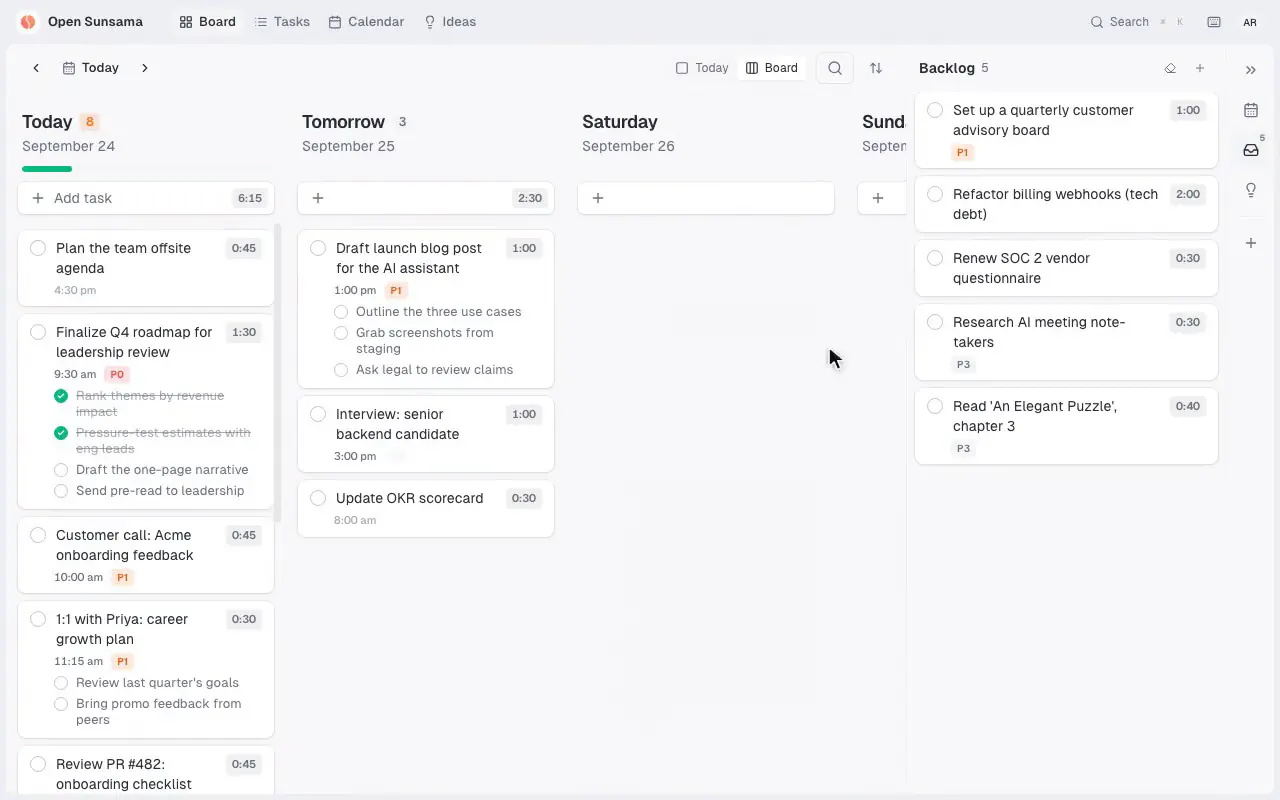
Pick today's tasks on a board of days
Your backlog sits next to Today and Tomorrow. Drag the tasks you will do into Today and give each one an estimate.
Pick today's tasks on a board of days Drop each task where you want it
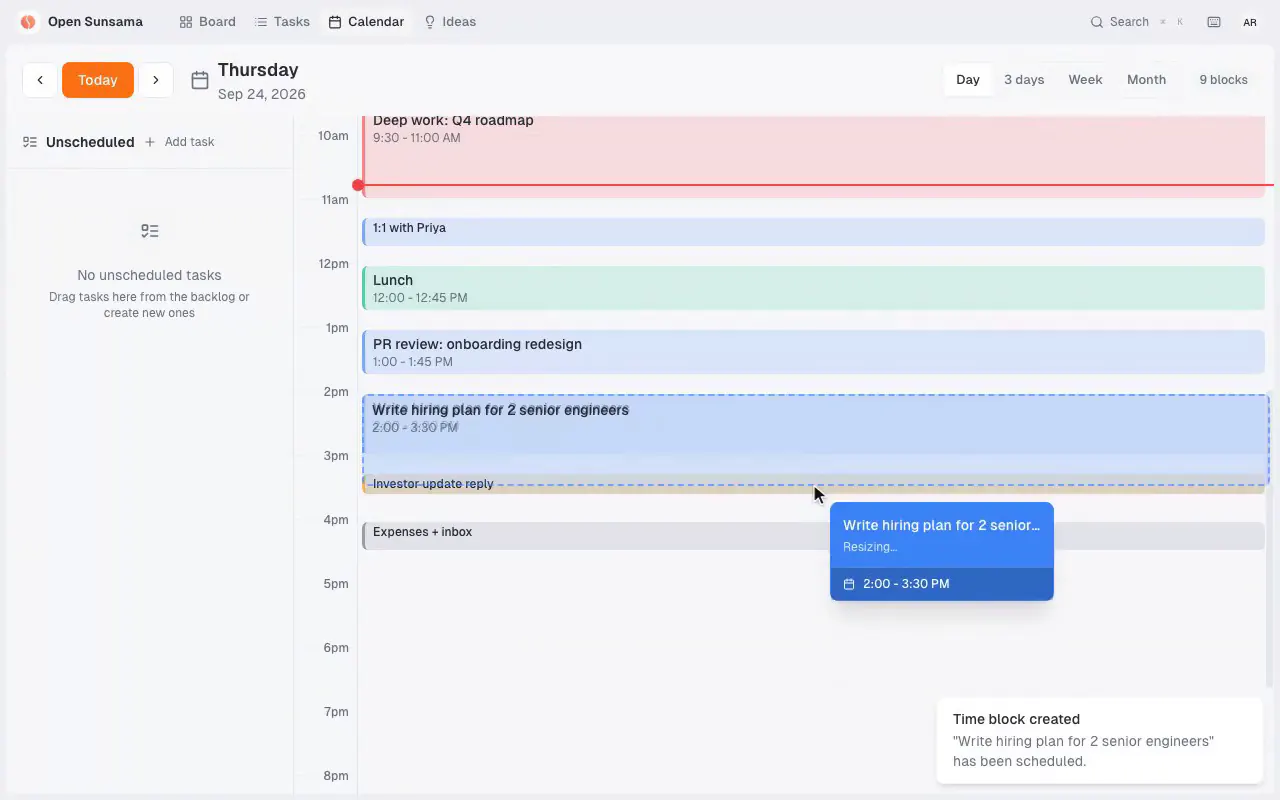
Drag a task into a free slot next to your meetings, then drag its edge to set the length. The block stays there until you move it.
Drop each task where you want it Work one block at a time
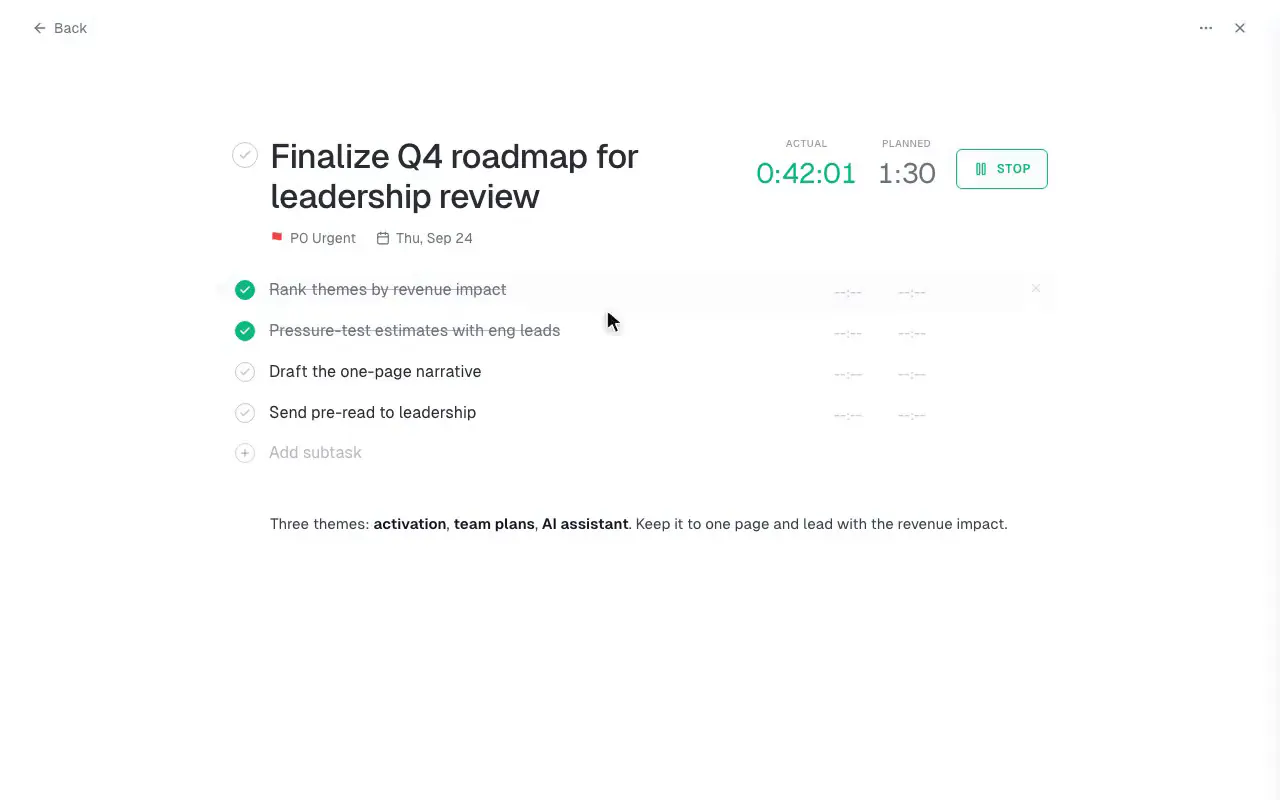
Start focus mode on the task in front of you. The timer tracks real time, so tomorrow's plan is more honest.
Work one block at a time Fix the plan from the keyboard
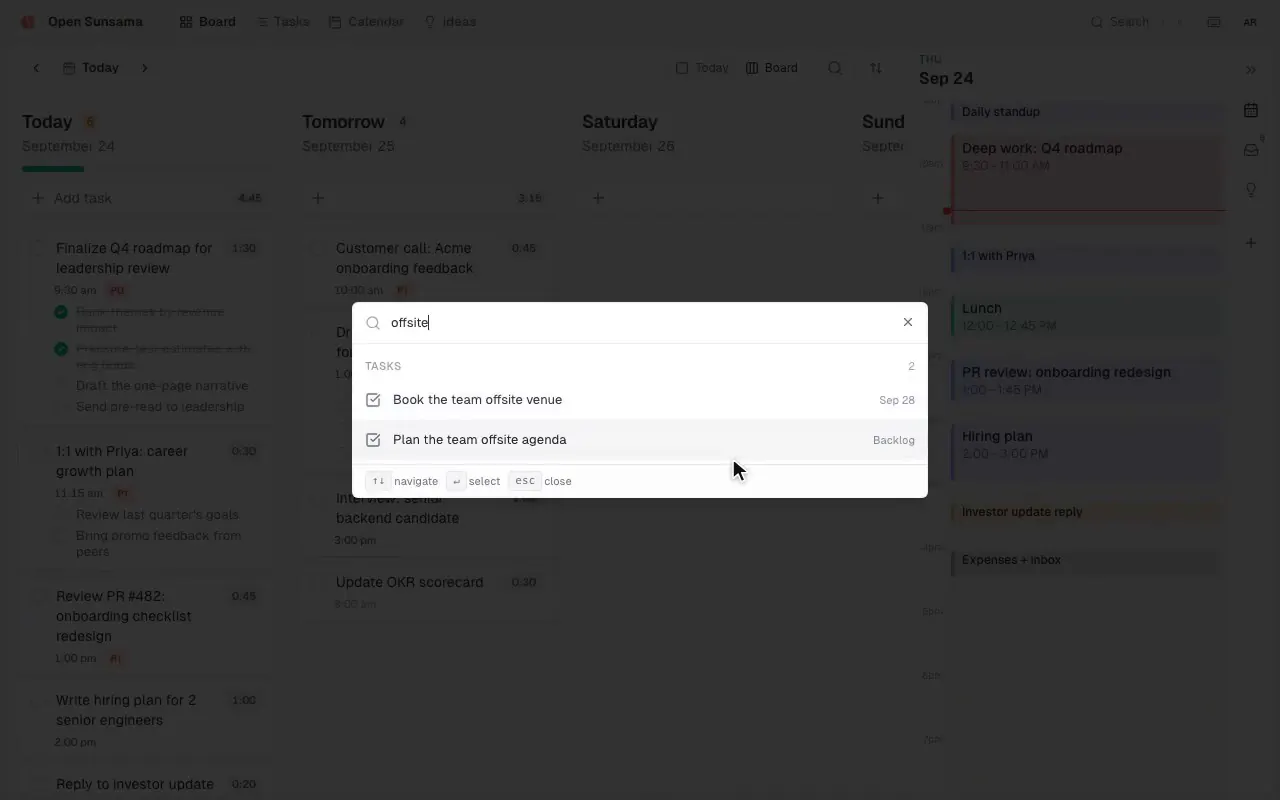
A meeting ran long? Press Cmd+K to find a task or jump to a day, and move it in seconds.
Fix the plan from the keyboard
AI native
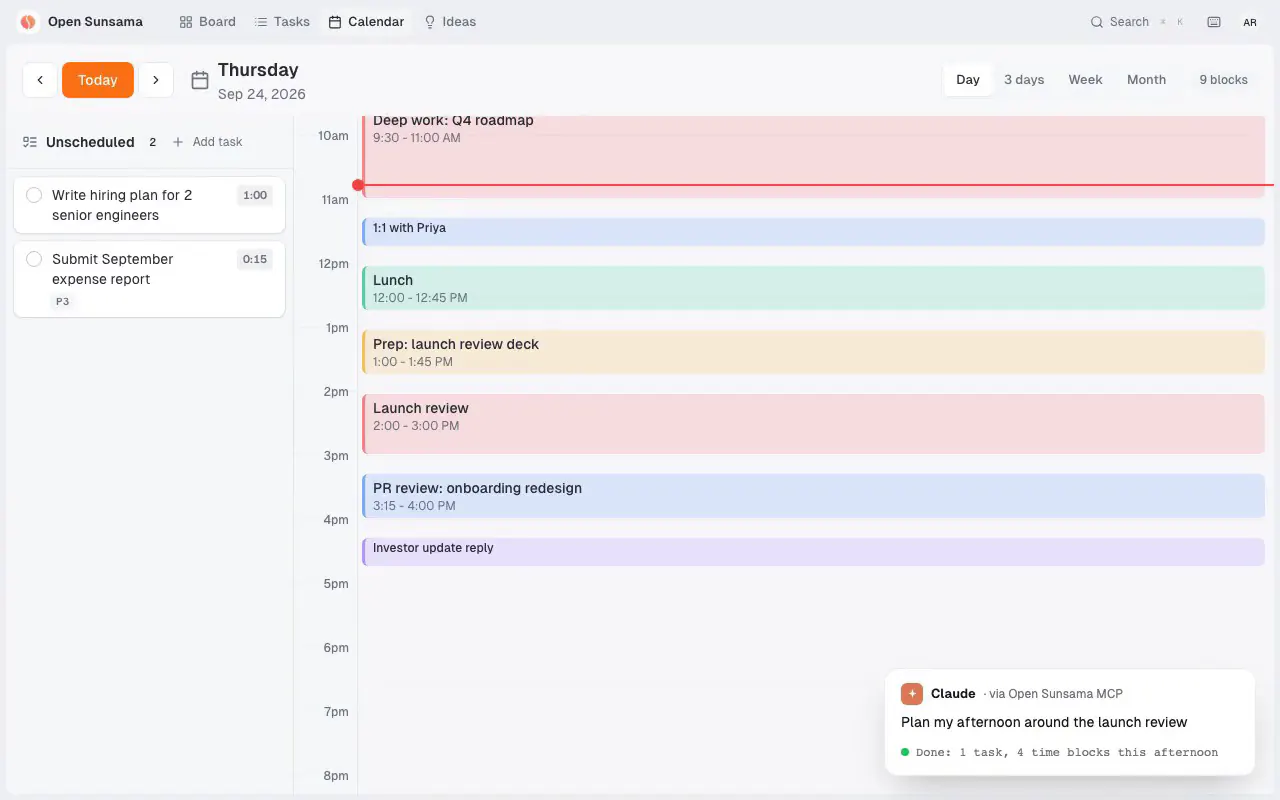
Your AI agent plans on request, and you see every block
Paste one URL into Claude, ChatGPT, Cursor or any MCP client, then sign in. Ask it to plan, and it creates tasks and time blocks around your meetings.
That is the middle path many Motion users ask for. The AI does the planning, and nothing moves until you ask. Set rules in plain words, like "no deep work after 4pm".
Motion has a public REST API, but we found only community-built MCP servers for it. Open Sunsama runs a hosted MCP server with 47 tools. Your agent can read your calendar events but can't change them.
MCP server URL: https://api.opensunsama.com/mcp
Prompts to try
- Plan my afternoon around my meetings. No deep work after 4pm.
- A meeting ran long. Move what's left into free slots today and tomorrow.
- Block two hours for the launch notes before Friday.
Tools it calls: get_schedule_for_day, list_tasks, create_time_block, update_time_block, link_task_to_time_block
Feature by feature
Open Sunsama trades Motion's autopilot for control, the code and any agent
Motion leads on automation, projects and phone apps. Open Sunsama leads on control and ownership. Here is each feature side by side.
| Feature | Open Sunsama | Motion |
|---|---|---|
| How blocks get made | You drag them, or your agent does | AI schedules them for you |
| Auto-scheduling | No: Ask your agent | Yes: Full |
| Moves tasks on its own | Never | Yes, when plans change |
| Time blocking on your calendar | Yes | Yes |
| Calendars | Yes: Google, Outlook, iCloud | Yes: Google, Outlook, iCloud |
| Board of days and a backlog | Yes | Task lists and projects |
| Projects and team workloads | No | Yes |
| AI agents over MCP | Yes: Hosted, any MCP client | Partly: Community-built only |
| Public REST API | Yes | Yes |
| Code you can read and self-host | Yes | No |
| Desktop apps | Yes: Mac, Windows, Linux | Partly: Mac, Windows |
| Phone | Partly: Mobile web app | Yes: iOS and Android |
Motion facts come from its pricing page, API docs and calendar help. We looked for an official MCP server and found only community-built ones. Checked September 2026.
What you give up
Leaving Motion costs you its auto-scheduler, team projects and phone apps
Motion is a good app. Here is what it does that Open Sunsama doesn't, so you can choose with clear eyes.
An auto-scheduler. Motion places each task by its deadline and length, then rebuilds the day when a meeting moves. Open Sunsama never moves tasks on its own. You place each block, or ask your agent to.
Team projects. Motion runs projects, deadlines and team workloads. Open Sunsama is built for one person's day.
Native phone apps. Motion has apps for iOS and Android. Open Sunsama's phone app is an early Android APK and an iOS TestFlight build, not in the app stores yet. It also runs in your phone's browser, and has desktop apps for Mac, Windows and Linux.
Built-in task integrations. Open Sunsama syncs your calendars only. It does not pull tasks from Slack, Asana or Jira. Tasks come in by hand, through the REST API, or from your AI agent.
A one-click import. There is no Motion importer. Move this week's tasks by hand, or paste your list into Claude and ask it to create them.
A license for company use. The code is public on GitHub. It uses a non-commercial license: you can read it, run it and self-host it for personal use. Companies need a commercial license. Read the license
How to switch
You can switch from Motion in three steps
Plan your first day in Open Sunsama the same morning you sign up.
Create an account, or self-host
Sign up on the web or download the desktop app. Prefer your own server? Follow the Docker guide.
Connect your calendars
Add Google Calendar, Outlook or iCloud in Settings. Your meetings show up next to your tasks, so you see what really fits.
Move this week's tasks
There is no Motion import. Add this week's tasks by hand, or paste your list into Claude and ask it to plan them. Keep Motion until you have planned five real days.
Questions before you switch from Motion
What is the best Motion alternative?
We build Open Sunsama, and we think it is the best pick for most people. You or your own AI agent plan the day, in an open-source planner you can self-host. If you want auto-scheduling, pick FlowSavvy for one person or Reclaim for teams. Compare 8 Motion alternatives
Is there an open-source Motion alternative?
Yes. Open Sunsama's code is public on GitHub, and you can self-host it with Docker for personal use. It has time blocking, focus mode, calendar sync and a hosted MCP server. Self-hosting guide
Does Open Sunsama auto-schedule my tasks?
No. There is no built-in auto-scheduler, so you always know why a block is where it is. If you want help, ask your AI agent to place the blocks.
Does Motion work with Claude or ChatGPT?
Motion has a public REST API, but we found no official MCP server, only community-built ones. Open Sunsama runs a hosted MCP server for Claude, ChatGPT, Cursor and any MCP client. Connect your AI
Can AI plan my day without auto-scheduling?
Yes. Connect Claude or ChatGPT to a planner with an MCP server and ask it to plan your day. In Open Sunsama, the agent creates tasks and time blocks you can see and change. Time blocking with AI
Can I import my tasks from Motion?
Not with one click. Move this week's tasks by hand, or paste your list into Claude or ChatGPT and let it create the tasks over MCP.
Is Open Sunsama really open source?
The code is public on GitHub. It uses a non-commercial license: you can read it, run it and self-host it for personal use. Companies need a commercial license. See the code
Plan tomorrow your way
Drag your tasks onto the calendar yourself, or ask the AI agent you already use. Either way, the plan stays where you put it.