Keyboard, API, MCP
A task manager for developers, with an API and MCP
Open Sunsama is an open-source task manager and daily planner for developers. Drive it from the keyboard, script it with the REST API, and let Claude Code or Cursor plan with you over MCP.
Get started · Download for desktop
The short answer
Open Sunsama is a task manager for developers that you can script, extend and run yourself
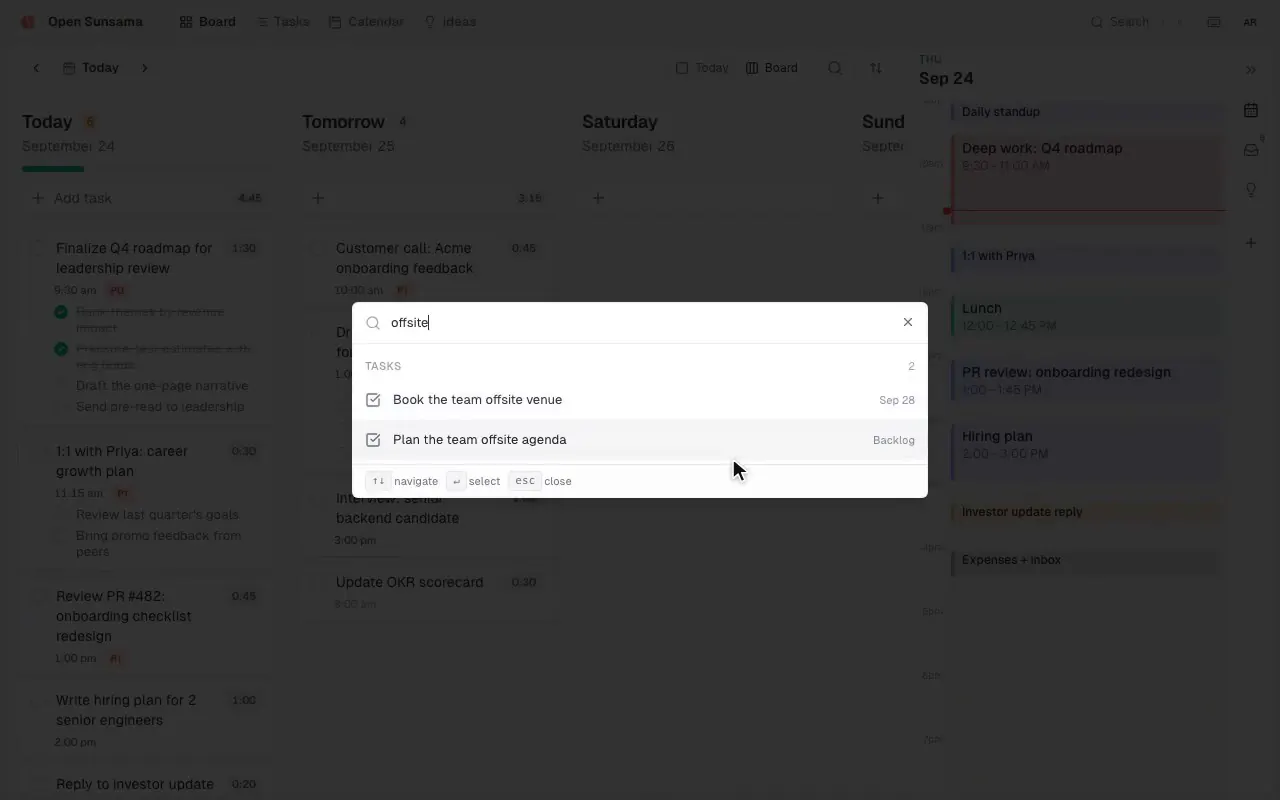
Open Sunsama is a task manager for developers who want speed and control. Your days are columns on a board, and your tasks go onto a calendar next to your meetings.
You can drive it three ways: the keyboard, the REST API, or any AI agent over MCP. All three change the same tasks and time blocks.
The code is public on GitHub. Read it, run it with Docker, or have your agent add the feature you need.
In short
- Cmd+K finds any task or day. Single keys add, defer and complete.
- A REST API with API keys scoped to what each script needs.
- A hosted MCP server with 47 tools for Claude Code, Cursor and ChatGPT.
- Self-host with one docker compose command.
- Desktop apps for Mac, Windows and Linux.
Why developers switch
Your planner works the way your editor does
On Reddit and Hacker News, developers name the same three problems: closed apps with no API, connectors that log you out, and too much clicking. Here is how Open Sunsama answers each one.
Your hands stay on the keyboard
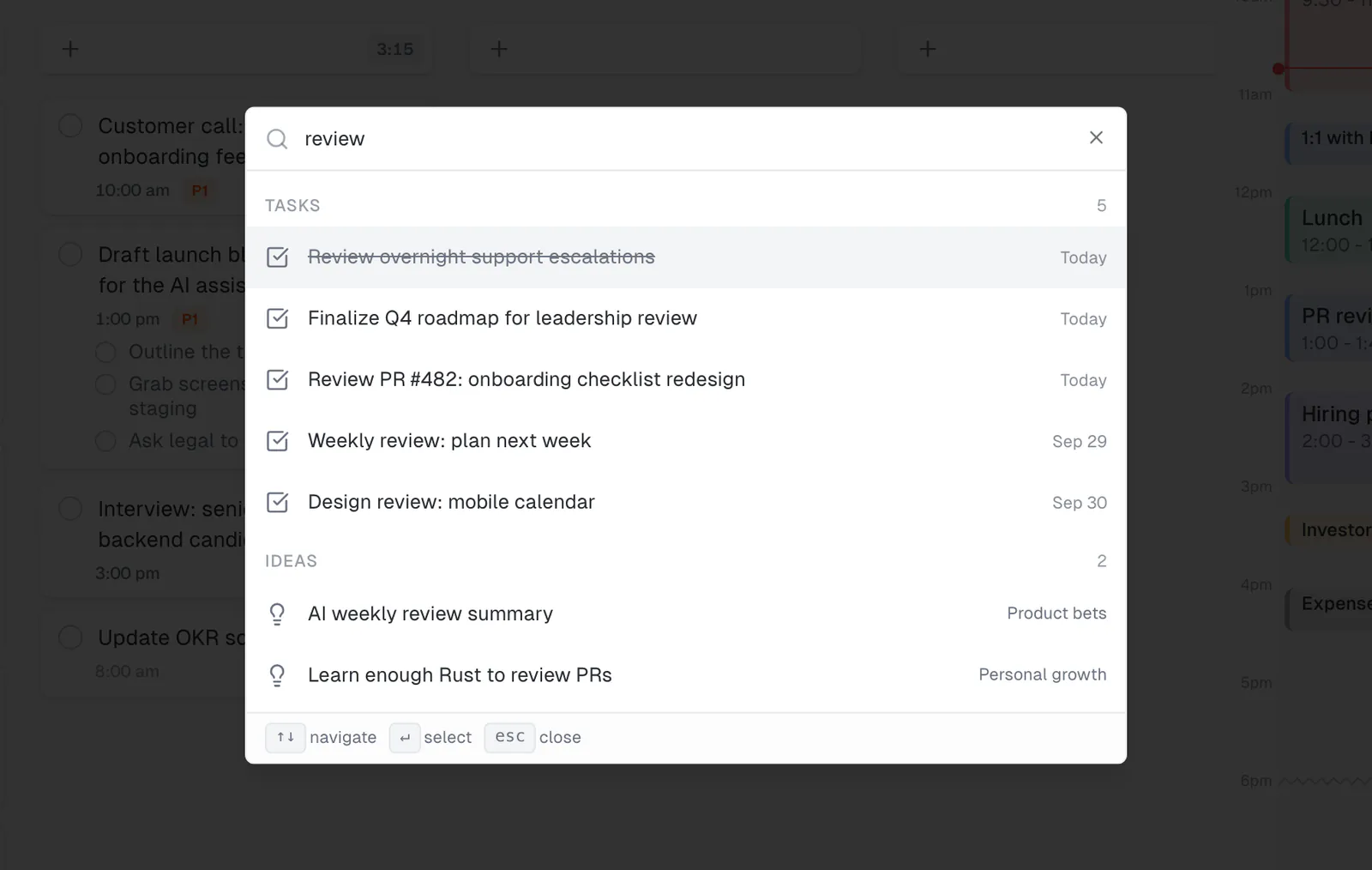
Press Cmd+K to search any task, jump to a day or run a command. Most actions have a single-key shortcut.
Hover a task and press C to complete it, D to push it to tomorrow, Z to send it to the backlog or F to start focus. Press Shift+? to see every shortcut.
Your agent reads and writes your plan, and stays signed in
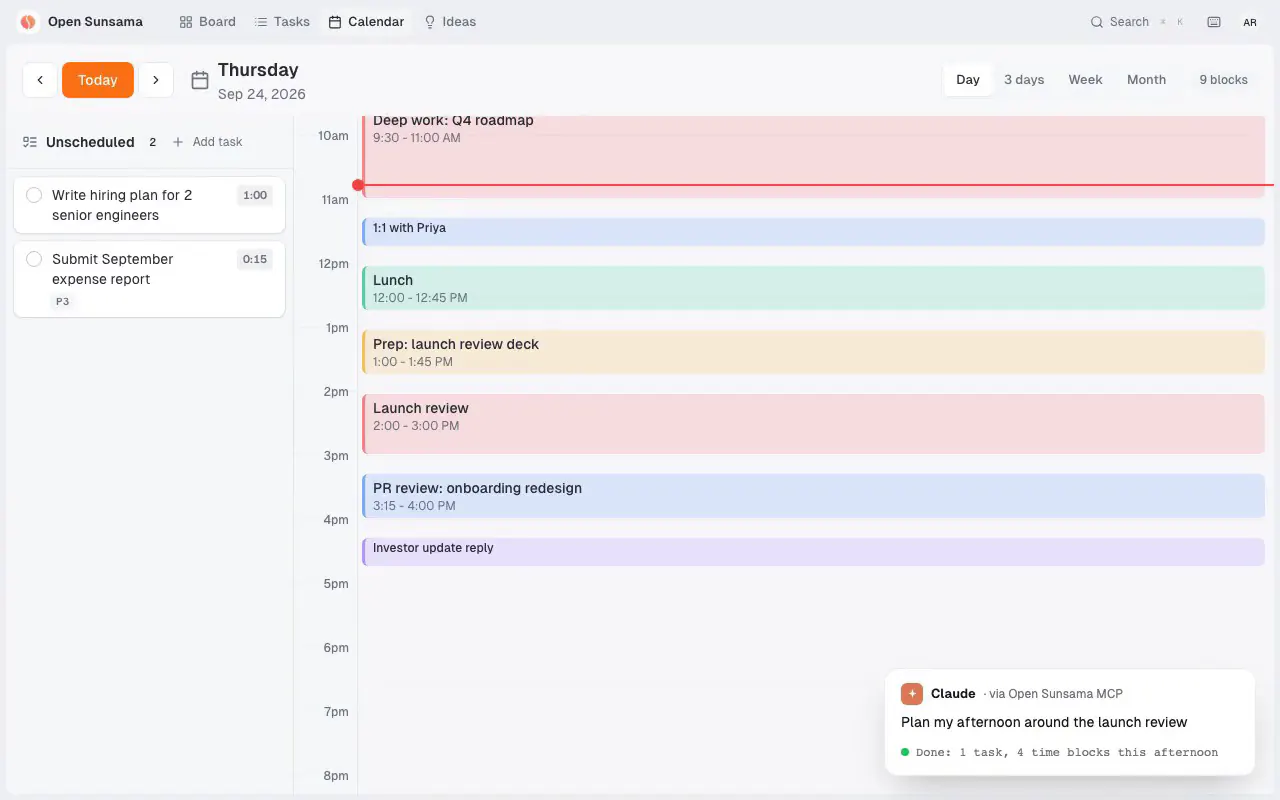
Paste one URL into Claude Code, Cursor or ChatGPT and sign in with OAuth. Tokens refresh on their own, so you don't log in again every morning.
Tasks, subtasks and time blocks live in one place. Your agent needs one connector, not a task app plus a calendar app.
- 47 tools, each marked read-only or destructive
- Meetings are read-only: your agent can't move them
- Estimates and actual minutes are in the data
Deep work gets a real slot on the calendar
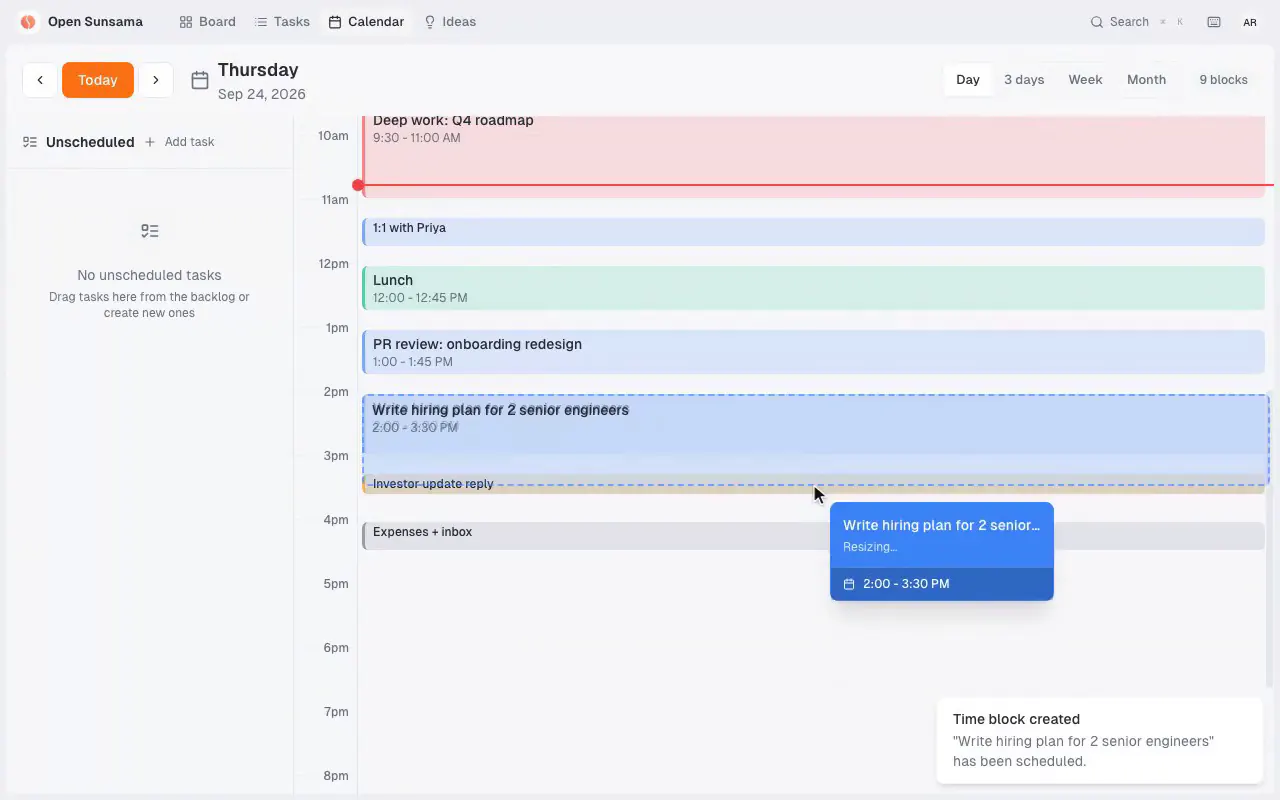
Drag a task onto the day view to block time for it. Your Google, Outlook or iCloud meetings sit right beside it.
So you can see a 2-hour refactor won't fit before standup, before you start it.
Connect it
You can connect an agent, a script or your own server in one step
Pick your way in. Each tab has the exact lines from the docs.
The REST API covers tasks, subtasks and time blocks: GET /tasks, POST /tasks, PATCH /tasks/:id, POST /tasks/:id/complete, GET /tasks/:id/subtasks, GET /time-blocks, POST /time-blocks, PATCH /time-blocks/:id.
API keys start with os_ and carry scopes such as tasks:read, tasks:write, time-blocks:write and calendar:read. Send them in the X-API-Key header.
Claude Code: # Add the hosted MCP server, then sign in once in the browser claude mcp add --transport http open-sunsama https://api.opensunsama.com/mcp
Cursor: { "mcpServers": { "open-sunsama": { "url": "https://api.opensunsama.com/mcp" } } }
REST API: # Create a task for today with a 60-minute estimate curl -X POST "https://api.opensunsama.com/tasks" \ -H "X-API-Key: os_live_xxx" \ -H "Content-Type: application/json" \ -d '{ "title": "Review the auth PR", "scheduledDate": "2026-09-24", "priority": "P1", "estimatedMins": 60 }'
Docker: git clone https://github.com/kaijiabo/open-sunsama.git cd open-sunsama docker compose up -d --build # Web app on :3000, REST API on :3001, MCP at :3001/mcp
The details
Open code means the planner can change when you need it to
No feature request that sits for years. If you need something, you or your agent can build it.
- Code you can read: A TypeScript monorepo on GitHub: Hono API, React web app, Tauri desktop. Point your agent at it and add what you need.
- Self-host with Docker: One command starts the web app, API, MCP server and PostgreSQL on your own box. Your data stays yours.
- REST API with scoped keys: Give each script only the scopes it needs. JSON in, JSON out, with the same shape on every route.
- Linux, Mac and Windows: Desktop apps for all three. Press Cmd+Shift+T in any app to add a task. The web app works in any browser.
- Planned vs actual: Each task has an estimate. The focus timer logs real minutes, and both are in the API.
- Live sync: A change from a script or an agent shows up on every open tab and device right away.
A typical day
Here is how a developer might run a day in Open Sunsama
An example day that mixes the keyboard, a script and two AI agents. Every step uses a real feature.
8:50 AM: Ask for the plan in the terminal. "What's on my schedule today, and what did I leave open yesterday?" Claude reads your tasks and meetings over MCP.
9:00 AM: Set today's three tasks. Press A to add the bug you just remembered. Press E to give it an estimate. Press D to push the rest to tomorrow.
9:30 AM - 11:30 AM: Deep work on the auth refactor. One task, one timer. The timer logs the real minutes next to your estimate.
11:30 AM: Standup. Your synced meeting sits next to your blocks. Your agent can read it, but it can't move it.
2:00 PM: Turn a TODO into a task. Select a // TODO: comment in Cursor and ask for a P2 task on Friday. It shows up on your board live.
3:00 PM - 4:30 PM: Code review block. A script posts to /time-blocks each morning, so review time is always on the calendar.
6:00 PM: Close the laptop. Check off what shipped. Unfinished tasks roll to tomorrow on their own.
Compare
Open Sunsama is the one you can script, self-host and change
Todoist, Sunsama and Akiflow all have an official MCP server now. The difference is who owns the planner.
| Feature | Open Sunsama | Todoist | Sunsama | Akiflow |
|---|---|---|---|---|
| Time blocking next to meetings | Yes: Drag tasks onto the calendar | Partly: Calendar layout on paid plans | Yes: Drag tasks onto the calendar | Yes: Blocks and time slots |
| Official MCP server | Yes: Hosted, OAuth | Yes: Hosted | Yes: Hosted, in Pro | Yes: Hosted, in Pro |
| Public REST API | Yes: Scoped API keys | Yes | No: Requested since 2019 | No: None we could find |
| Code you can read and change | Yes | No | No | No |
| Self-host | Yes: Docker Compose | No | No | No |
| Linux desktop app | Yes | Yes | Yes | No: Mac and Windows |
| Phone | Partly: Early Android APK and iOS TestFlight; mobile web app | Yes: iOS and Android | Yes: iOS and Android | Yes: iOS and Android |
Competitor facts come from each app's site and docs: Todoist downloads, Todoist calendar layout, Todoist MCP, Sunsama MCP, Sunsama API request and Akiflow. Checked September 2026. More detail in task managers with MCP.
- 47 MCP tools
- 3 Desktop apps
- 1 URL for any agent
- Source code on GitHub
Questions developers ask about Open Sunsama
What is the best task manager for developers?
We build Open Sunsama, and we think it is the best pick for developers who want control. It is keyboard-first, has a REST API and a hosted MCP server, and you can self-host the code. Pick Todoist if you mostly need a fast list on every device. Time blocking apps for developers
Does Open Sunsama have an API?
Yes. A REST API covers tasks, subtasks and time blocks. Create an API key in Settings → API Keys, pick its scopes, and send it in the X-API-Key header. API authentication
How do I use Open Sunsama with Claude Code or Cursor?
In Claude Code, run claude mcp add --transport http open-sunsama https://api.opensunsama.com/mcp and sign in. In Cursor, add the same URL to mcp.json and click Connect. MCP setup guides
Is there an MCP task manager that also does time blocking?
Yes. Open Sunsama's MCP server has 47 tools for tasks, subtasks, time blocks, Ideas boards and your synced meetings. Your agent can see the whole day and block time around your meetings. Task managers with MCP
Can I self-host Open Sunsama?
Yes. Clone the repo and run docker compose up -d --build. You get the web app, the REST API and the MCP server on your own machine. The prebuilt desktop app can't point at a self-hosted server yet. Docker guide
Is Open Sunsama open source?
The code is public on GitHub. It uses a non-commercial license: you can read it, run it and self-host it for personal use. Companies need a commercial license. See the code
Does Open Sunsama integrate with GitHub, Linear or Jira?
Not for GitHub, Linear or Jira yet. You can import individual Todoist tasks, bring other tasks in through the REST API, or ask your agent to file them over MCP.
Plan tomorrow from your terminal
Connect Claude Code or Cursor in one line, script the rest with the API, or run the whole thing on your own server.